No MCI device opened: Unterschied zwischen den Versionen
Zur Navigation springen
Zur Suche springen
Ddang (Diskussion | Beiträge) (Die Seite wurde neu angelegt: „ ===<u>'''Fehlermeldung:'''</u>=== "Kein MCI Gerät geöffnet" bei Start des HVS32 ===<u>'''Fehlerursache:'''</u>=== Der Fehler tritt unter andere…“) |
Ddang (Diskussion | Beiträge) |
||
| Zeile 1: | Zeile 1: | ||
| − | ===<u>''' | + | ===<u>'''Error message:'''</u>=== |
| − | " | + | "No MCI device opened" when starting the HVS32 |
| | ||
| − | ===<u>''' | + | ===<u>'''Error cause:'''</u>=== |
| − | + | The error appears when the AutomatikPolling starts and the "AutomatikPolling.avi" (status animation) tries to open. This action tries to access Windows Media Player components that cause the error message. | |
| − | ===<u>''' | + | ===<u>'''Solution:'''</u>=== |
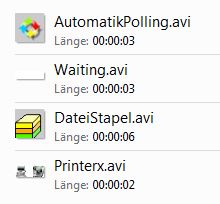
| − | [[File:Avi Dateien im HVS VZ.JPG|right|Avi Dateien im HVS VZ.JPG]] | + | [[File:Avi Dateien im HVS VZ.JPG|right|Avi Dateien im HVS VZ.JPG]]Search the *.avi in the HVS32 root directory -> Right click -> Properties -> General/Open with/Change... -> Select Windows Media Player -> Check set as default -> Save with OK |
| − | + | To check, open by double clicking. If necessary, configure the Windows Media Player. | |
Version vom 15. Juli 2024, 10:59 Uhr
Error message:
"No MCI device opened" when starting the HVS32
Error cause:
The error appears when the AutomatikPolling starts and the "AutomatikPolling.avi" (status animation) tries to open. This action tries to access Windows Media Player components that cause the error message.
Solution:

Search the *.avi in the HVS32 root directory -> Right click -> Properties -> General/Open with/Change... -> Select Windows Media Player -> Check set as default -> Save with OK
To check, open by double clicking. If necessary, configure the Windows Media Player.