Dispatch conclusion: monthly list print: Unterschied zwischen den Versionen
Zur Navigation springen
Zur Suche springen
print
Mibili (Diskussion | Beiträge) |
Ddang (Diskussion | Beiträge) |
||
| (13 dazwischenliegende Versionen von einem anderen Benutzer werden nicht angezeigt) | |||
| Zeile 1: | Zeile 1: | ||
| + | [[de:Versand-Abschluß:_Monatsliste_drucken]] | ||
| + | |||
The monthly list shows you all list´s from the selected carrier in a period selected by the user. It also shows you the number of packages, weight and charges. | The monthly list shows you all list´s from the selected carrier in a period selected by the user. It also shows you the number of packages, weight and charges. | ||
| Zeile 5: | Zeile 7: | ||
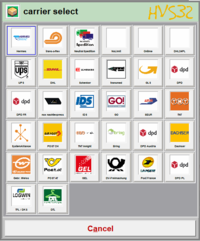
== 1. carrier select == | == 1. carrier select == | ||
| − | Select the carrier, for which you wanna print the monthly list. [[File: | + | Select the carrier, for which you wanna print the monthly list. [[File:carrierselect.PNG|none|sub|200px|carrierselect.PNG]] |
| − | |||
| − | |||
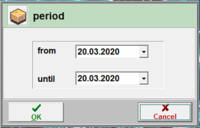
| − | + | == 2. period == | |
| − | + | It only affects the list´s that were created/printed in the period selected by the user.[[File:period.PNG|none|sub|200px|period.PNG]] | |
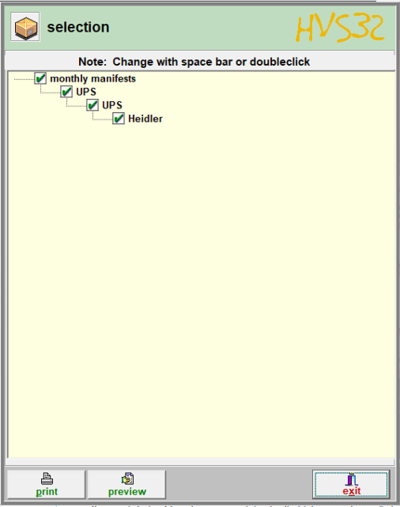
| − | + | == 3. selection == | |
| − | === | + | [[File:selection.PNG|right|400px|selection.PNG]]In selection you can see for which dispatch-type there are monthly list´s available. If you dont need the monthly list for a specific dispatch-type, you can deactivate it by pressing twice on the mark for the affected dispatch-type. By doing that there will be no monthly list printed for the selected dispatch-type |
| + | === print === | ||
| − | : | + | :The monthly list will be printed on the printer which is set in the configurator (setup -> configurator -> general -> output channels). |
| − | === | + | === preview === |
| − | : | + | :you will get a preview of the actual list. If you close the window, you will land on the main menu of HVS32 |
| − | : | + | :To print the list, you have to repeat the steps and press on the print button instead on preview. |
Aktuelle Version vom 6. September 2024, 15:24 Uhr
The monthly list shows you all list´s from the selected carrier in a period selected by the user. It also shows you the number of packages, weight and charges.
approach:
1. carrier select
Select the carrier, for which you wanna print the monthly list.

2. period
It only affects the list´s that were created/printed in the period selected by the user.

3. selection

In selection you can see for which dispatch-type there are monthly list´s available. If you dont need the monthly list for a specific dispatch-type, you can deactivate it by pressing twice on the mark for the affected dispatch-type. By doing that there will be no monthly list printed for the selected dispatch-type
- The monthly list will be printed on the printer which is set in the configurator (setup -> configurator -> general -> output channels).
preview
- you will get a preview of the actual list. If you close the window, you will land on the main menu of HVS32
- To print the list, you have to repeat the steps and press on the print button instead on preview.