Setup: data export/import configuration: Unterschied zwischen den Versionen
Zur Navigation springen
Zur Suche springen
Mibili (Diskussion | Beiträge) |
Lappl (Diskussion | Beiträge) K (Added DE link) |
||
| (3 dazwischenliegende Versionen von einem anderen Benutzer werden nicht angezeigt) | |||
| Zeile 1: | Zeile 1: | ||
| − | + | [[de:Setup:_Datenexport/import-Einstellungen]] | |
In the export/import-settings you can see and configurate all interfaces from the HVS32 and every interface which is connected to the HVS32 | In the export/import-settings you can see and configurate all interfaces from the HVS32 and every interface which is connected to the HVS32 | ||
| Zeile 31: | Zeile 31: | ||
= Export = | = Export = | ||
| − | :in "export" you can define the interfaces from the HVS32. [[File: | + | :in "export" you can define the interfaces from the HVS32. [[File:dataexport.PNG|right|dataexport.PNG]] |
=== dataname === | === dataname === | ||
:you can determine the path and the dataname for the exportfile. | :you can determine the path and the dataname for the exportfile. | ||
Aktuelle Version vom 26. August 2024, 10:37 Uhr
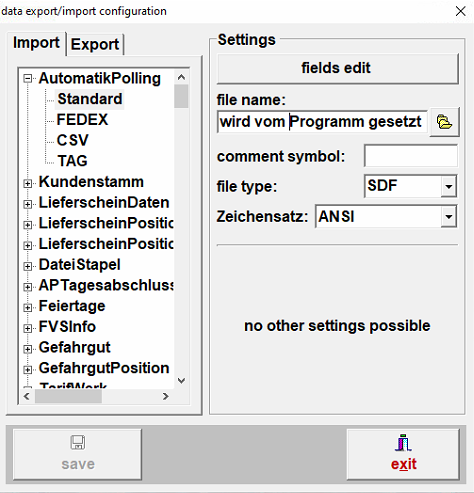
In the export/import-settings you can see and configurate all interfaces from the HVS32 and every interface which is connected to the HVS32

Import
- in Import you can define the interfaces that are connected to the HVS32.
dataname
- you can edit the dataname in the configurator.
comment sign
- with the comment sign you can define the seperator, for example by using the datatype CSV you can use the comment sign ";" (semicolon).
dateitype
- you can choose between the different data types of the importfile.
font
- here you can determine the font.
field edit
- with "field edit" you can define the mapping of the HVS32 connected to your interface.
Export
- in "export" you can define the interfaces from the HVS32.
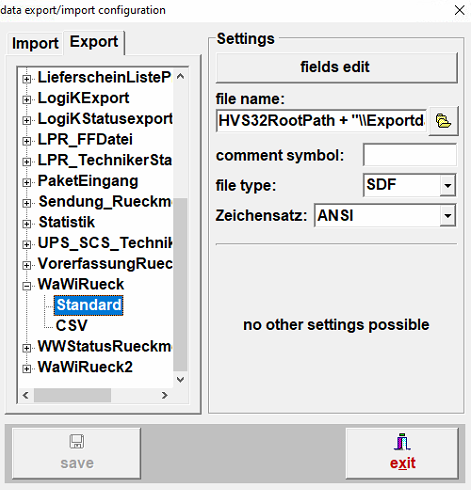

dataname
- you can determine the path and the dataname for the exportfile.